Mostrando entradas con la etiqueta CT Hania's Design. Mostrar todas las entradas

domingo, 30 de junio de 2013

Tutorial - From Hell (Desde el Infierno) (Spanish)


Tutorial CT para Hania's Designs y LadyMishka.

Para este tutorial he usado el tube "Vampire Lulu (White Moon)" de  LadyMishka. Por favor, compra el tube en Pics For Design AQUI
Tambien use el fantastico kit "Devil's Bride", de Hania's Design. Puedes encontrarlo en Pics For Design AQUI o Scraps And the City AQUI

Para este tutorial solo necesitas el kit, el tube y una mascara de tu elección. You use una mascara de AQUI. La fuente usada es "Olho de Boi"

Empecemos. Abre tu carpeta del kit, elementos, y vamos a poner los siguientes elementos en un lienzo transparente, tamaño 500X500 pix.

elemento 108
elemento 42 (duplicar y espejo)
elemento 27
elemento 57

Por favor, sigue la siguiente vista previa como una referencia para las posiciones:
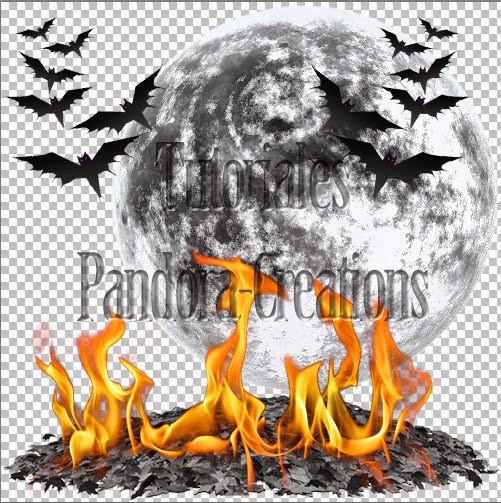

El siguiente paso es poner los siguientes elementos:
 
elemento 103
elemento 10 (duplicar, redimensionar al 55% y rotar 40º a la derecha)
elemento 105

Sigue la previa como referencia:
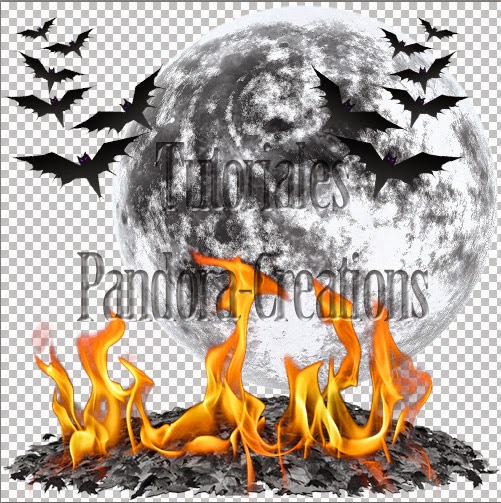

Ahora es hora de poner el tubo, mezclandolo con la creacion de la manera que quieras. Puedes mirar mi creacion para tener una referencia si quieres. Yo suelo duplicar el tubo y usar la goma de borrar en las areas que quiero suprimir :D

Tambien ponemos los elementos 36, 1 y 19.
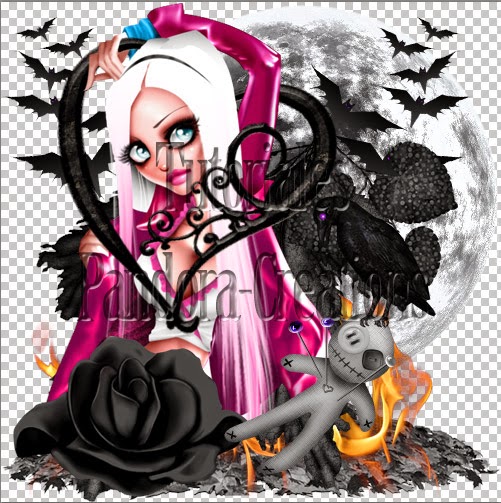

Pon el papel 6 bajo tu ultima capa y combinala con la mascara de tu eleccion.

Despues, pon tu nombre, y muy importante, los créditos en el tag, y ya esta listo!!!


Tutorial realizado por Pandora-Creations en junio de 2013. Por favor, no robes mi trabajo. Si quieres seguir el tutorial y enviarme tu trabajo, puedes hacerlo al correo electronico que muestro en mi blog. Si quieres mostrar este tutorial en tu blog o en tu foro, por favor, preguntame primero.
Gracias, disfruta con tu PS / PSP !!!

Tutorial - From Hell (English)


Tutorial CT for Hania's Designs and LadyMishka.

For this tutorial I use the tube "Vampire Lulu (White Moon)" from LadyMishka. Please, purchase the tube at Pics For Design HERE
Also I use the awesome kit "Devil's Bride", by Hania's Design. You can find the the kit here on Pics For Design HERE or Scraps And the City HERE

For this tutorial only need the kit, the tube and 1 mask of your choice. I use a mask from here. The font used is "Olho de Boi"

Lets go. Open the folder of your kit, elements, and we going to put the following elements on a transparent canvas, size 500X500 pix.

element 108
element 42 (duplicate and mirror)
element 27
element 57

Please, follow the next preview like a reference position:


Next step is put the follow elements:

element 103
element 10 (duplicate, resize at 55% and rotate 40º right)
element 105

Follow this preview as reference


Now is time to put the tube, mixing with the creation as you want. You can look my creation to have a reference if you want. I usually duplicate the tube an use the eraser in the areas that I want to delete :D

And also put the elements 36, 1 and 19.


Put the paper 6 under your last layer and combine with the mask of your choise.

Later, put your name, and very important, the credits on the tags, and is ready!!!


Tutorial made by Pandora-Creations on jun of 2013. Please, don't steal my work. If you want to follow the tut and send me your work, you can do it at the email that I show on my blog. If you want to show this tutorial on your blog or forum, please, ask me first.
Thank you, enjoy with your PS / PSP !!!

jueves, 16 de mayo de 2013

Cluster Frame 7 : CT Hania's Design

De nuevo estoy aqui!!!
Quiero traeros esta vez un nuevo cluster frame realizado a partir del kit ANGEL, de Hania's Design, el cual me ha encantado!!! De hecho, he sacado ayer mismo un nuevo tube al que le va perfecto, y es por esa razon por la que lo he escogido como ejemplo.


Here I am again!
I want to bring you this time a new cluster frame made ​​from ANGEL kit, by Hania's Design, which I loved! In fact, yesterday I got a new tube to which it is perfect, and it is for this reason that I have chosen as an example.


ScrapKit:

Tube FULL ARIES VERSION


 Y aqui esta el cluster frame para descargar
And here is the Cluster Frame to download


miércoles, 17 de abril de 2013

Tag CT 14: Cute Pink !!!

Tag NOT FOR REQUEST


I want to show you my last CT Tag
It was make with the awesome Prepaid Project from Lady Mishka, "Bunny Puta", who are still available on her NEW STORE 
Kawaii Pucks
 There are only 9 copys availables, so Hurry Up and get your copy!!!! Only by paypal method!!!

 
Don't you think is amazing??? I love this amazing cute chibimishkas!!! the most cute chibis on the internet!!!

Also, for this tag I used the FREE CLUSTER FRAME NUMBER 6, make with the amazing kit of Hania's Design. You can read more on the previous entry of the blog, here


Cluster Frame 6: Sweet Pink

I want to show you my new creation with the awesome kit of Hania's Desing. 
 
Hania has a lot of kits and all of them are AWESOME!!!!
With one of her newest kits, FERONIA, I've maken this cluster frame for free, so with it and a bit of imagination you can make your own tags.
 
I hope you like it!!!


You can buy the original kit on all her stores, includes SATC, now on SALE for only $ 1,50 !!!

 
Don't forget visit her blog to found where you can found it ;)

domingo, 17 de marzo de 2013

Tag CT 13: The Cutest!!!


Tag NOT FOR REQUEST

Look!!!
I want to show you my new tag, make with the amazing tube of Lady Mishka, and the awesome kit of Hania's Design!!

This amazing tube is a prepaid commision for SATC. Now, the project is close, but you can find a lot of tubes of LadyMishka here:

And the kit "Easter Cutie", from Hanias's design, also can found on SATC


Tag 12 CT: MMMM Pizza!!!


Good Morning!!!!
Who want pizza???? Me!! of course, I love pizza!!! And I want to gift you with a cluster frame from the kit Pizza Girl from Hania's Design, and of course, with the sample of the tag, also with the art of LadyMishka!!!

Look the tag ;)
I will only offer 10 of this one ;)
Send me and email with the name who wants with the subject line "Tag 12 - Pizza!!" to the following email addres:
(  pandora.creations.art (at) gmail.com  )
 (only until 20/03/2013)
You can found the tube here
 And the kit here:

And now, you can download the cluster frame number 5 of my colection. Remember that the cluster have the correct credits to be added with all tubes ;) I will be happy if you use it and send me your creation!!! Download now!!!


viernes, 1 de marzo de 2013

Tutorial EmoHolic (Español)

Found the English version HERE
 

Este tutorial esta hecho y escrito por mi, con mis propias ideas. Cualquier semejanza con otro tutorial es puramente coincidencia.

Elementos Necesarios
 Tubo de tu eleccion. Yo he usado el tubo Tiffany, de Lady Mishka.
Puedes comprar su trabajo  aqui
 Scrapkit: Emo Tiffany, de Hania's Designs
Y puedes comprar su kit aqui
 Un WordArt gratuito que hice para mi proyecto especial 52 semanas.
Puedes encontrarlo aqui
Fuente a tu gusto. Yo estoy usando la fuente llamada Mon Amour Script Art
No requiere pluggins

Elementos usados del kit

Element 1, Element 2 , Element 3, Element 5,
Element 10, Element 14, Element 15, Element 21
Element 24, Element 47, Element 50,
Element 54, Element 61, Element 70
Papeles usados del kit
Ninguno

Vamos a empezar

Abrimos un paño transparente de 600x600
Elemento 24. Ponlo en el lado izquierdo. Duplicar-imagen-espejo. Ponlo en el lado derecho.
Elemento 70 - redimensionar. Ajusta el tamaño y ponlo en el centro.
Elemento 47, ponlo detras de todos ellos.
Mira esta imagen como referencia.

 
Ahora, añadimos los siguientes elementos. Redimensionar si piensas que es necesario.
Elemento15
Elemento  1
Elemento10
Elemento  14
Elemento5
Por favor, mira mi composición como referencia para tu trabajo. 


Ahora es hora de añadir el tubo, mira


Tiempo para añadir nuevos elementos, pero ahora, deben estar por encima del tubo. Estos elementos son:
Elemento50
Elemento  3
Elemento21
Elemento  2
Elemento61
Elemento  54
De nuevo, por favor, sigue mi composicion


Finalmente, necesitamos añadir el wordart EmoHolic. Debes ponerlo por debajo del tubo. Por favor, mira la composicion ;)


Añade tu nombre, creditos e información de copyrights, y ya esta hecho!!

Debes recordar que esto es solo unas cuantas instrucciones, pero tu resultado puede ser cambiado y original dependiendo del tubo que uses, mira, otra version!!


Tutorial realizado por Pandora-Creations el 1 de marzo de 2013. No se permite copiar parcial o totalmente sin consentimiento expreso de la autora. Contacta conmigo para cualquier duda o para enviarme tus resultados!!!! Gracias!!

Tutorial EmoHolic (English)

Encuentra la version en español AQUI


This tutorial was made and written by my own ideas any resemblance to other tutorials is purely coincidental.

Supplies Needed
 Tube of choice. I'm using the tube Tiffany, by Lady Mishka
You can purchase her work  here
 Scrapkit: Emo Tiffany, by Hania's Designs
You can purchase her kit here
 A freebie WordArt that I make for my special Project 52 weeks.
You can found it here
Font of choice. I'm using font called Mon Amour Script Art
No plugins needed.

Elements used from kit

Element 1, Element 2 , Element 3, Element 5,
Element 10, Element 14, Element 15, Element 21
Element 24, Element 47, Element 50,
Element 54, Element 61, Element 70
Papers used from kit
None

Lets' get Started 
Open new raster 600x600
  Element 24. Put in the left side. Duplicate - image - mirror - put on the right side.
Element 70 - resize it. Adjust size and put in the middle
Element 47 put behind all of them.
Look this image for reference


Now, add the followin elements. Resize them if you think is necesary
Element 15
element 1
Element 10
Element 14
Element 5
Please, look my composition as reference for the work.


Now is the time to add the tube, look


Time to add new elements, but now, they must be in front of the tube. These elements are:
Element 50
Element 3
Element 21
Element 2
Element 61
Element 54
Again, please follow my composition:


Finally, we need add the wordart EmoHolic. You must put below the tube. Please, look my composition ;)


Add your name, credits and copyright info and we are done! 


 You must remember that this is only a few instructions, but your result can be change and original depending the tube you use, look another variation!!!


Tutorial made ​​by Pandora-Creations on March 1, 2013. Not copy whole or in part without the express consent of the author. Contact me for any questions or to send your results!! Thank you!

miércoles, 27 de febrero de 2013

Tag 10 CT: Sexy Blow

*****************************************************
ENGLISH // INGLES
******************************************************
LadyMishka and Hania's Design Creative Team

The caracteristic are: size 600x600 pix. in png format with transparent bg.
For obtain this tag, you can write me an e-mail with the subject "Request Tag 10 CT: Sexy Blow"

  . STATUS: · CLOSE· 
 DONE ONLY 10 TAGS OF THIS ONE
Thank you!!!
(  pandora.creations.art (at) gmail.com  )

 For this tag I used an old tube from Lady Mishka,
" STRAWBERRIES "
with different colors and a lot of layers
!!!!
 Also, I use the Cluster Frame that I've maken yesterday, with the wonderful kit of Hania's Design "Blowing in the Wind".
Do you want to know more about this Cluster and
the kit of Hania???
Please, go to this post and read more ;)


  ******************************************************
SPANISH // ESPAÑOL
******************************************************

EQUIPO CREATIVO DE LADYMISHKA Y HANIA'S DESIGN
 
Las caracteristicas son de tamaño 600x600 pixeles y en formato png con fondo transparente
Para pedir este tag, puedes escribirme un correo con el asunto " "Solicitud Tag 9 CT LadyMishka: Beautiful day".


. ESTADO:  · CERRADO· 
HICE 10 FIRMAS DE ESTA
 
Gracias!!!!!
(  pandora.creations.art (at) gmail.com  )
 
Para este tag usé un antiguo tubo de Lady Mishka,
" STRAWBERRIES "
con diferentes colores y un monton de capas!!
Tambien usé el Cluster Frame que hice ayer, con el fantastico
kit de Hania's Design, "Blowing in the Wind".
Quieres saber mas sobre este Cluster y 
el kit de Hania??
Por favor, ve a este post y lee mas ;)


martes, 26 de febrero de 2013

CT Cluster Frame

I want to show you my new creation with the awesome kit of Hania's Desing. 
Look, with the Kit Blowing In the Wind I've done this Cluster, and I want to share with all of you and Tomorrow I will bring you an awesome tag for offer ;)


Don't forget visit her blog to found where you can found it ;)